πŸŽ“ Computer Science & Engineering Portal

Master Engineering Disciplines with Structured Notes

Comprehensive academic lecture notes, exam-oriented unit summaries, laboratory manuals, and previous year question papers designed strictly for university students.

πŸ“‘

University Syllabi

AKTU & AICTE aligned semester guidelines.

πŸ“

Exam Question Papers

Previous 5 years solved university papers.

πŸ’‘

Lab Manuals & Viva

Practical codes with outputs & interview Qs.

Core Subjects & Units Hub

Click on any specific unit to immediately view its lecture notes below

Viewing All Lectures

Case Study of Oracle

Case Studies

The following case studies for Informix demonstrate some of the features of the Oracle Database Gateway. You can verify that the gateway is installed and operating correctly by using the demonstration files included on the distribution media.

The demonstration files are automatically copied to disk when the gateway is installed.

This chapter contains the following sections:

  • Case Descriptions
  • Distribution Media Contents
  • Demonstration Files
  • Demonstration Requirements
  • Creating Demonstration Tables
  • Case 1: Simple Queries
  • Case 2: A More Complex Query
  • Case 3: Joining Informix Tables
  • Case 4: Write Capabilities
  • Case 5: Data Dictionary Query
  • Case 6: The Pass-Through Feature

Case Descriptions

The cases illustrate:

  • A simple query (Case 1)

  • A more complex query (Case 2)

  • Joining Informix tables (Case 3)

  • Write capabilities (Case 4)

  • A data dictionary query (Case 5)

  • The pass-through feature (Case 6)

Distribution Media Contents

The distribution media contains the following:

  • Demonstration files

  • One SQL script file that creates the demonstration tables in the Informix database

  • One SQL script file that drops the demonstration tables from the Informix database

Demonstration Files

After a successful gateway installation, use the demonstration files stored in the directory $ORACLE_HOME/dg4ifmx/demo where $ORACLE_HOME is the $ORACLE_HOME directory under which the gateway is installed. The directory contains the following demonstration files:

Demonstration Files

Demonstration Files

bldifmx.sql

case4c.sql

case1.sql

case5.sql

case2.sql

case6a.sql

case3.sql

case6b.sql

case4a.sql

case7.sql

case4b.sql

dropifmx.sql


Demonstration Requirements

The case studies assume these requirements have been met:

  • The gateway demonstration tables are installed in the Informix database

  • The Oracle database has an account named SCOTT with a password of TIGER

  • The Oracle database has a database link called GTWLINK (set up as public or private to the user SCOTT) which connects the gateway to a Informix database as SCOTT with password TIGER2

    For example, you can create the database link as follows:

    SQL> CREATE DATABASE LINK GTWLINK CONNECT TO SCOTT
    2 IDENTIFIED BY TIGER2 USING 'GTWSID';
  • Oracle Net Services is configured correctly and running.

  • The Informix environment variable, INFORMIXDIR, is set correctly.

Creating Demonstration Tables

The case studies are based on the GTW_EMP, GTW_DEPT, and GTW_SALGRADE tables. If the demonstration tables have not been created in the Informix database, use the bldifmx.sql script to create them, as follows:

Set environment variable DELIMIDENT.

If you have the Bourne or Korn Shell, enter the following:

$ DELIMIDENT = y; export DELIMIDENT

If you have the C Shell, enter the following:

$ setenv DELIMIDENT y

$ cd $ORACLE_HOME/dg4ifmx/demo$ dbaccess database_name bldifmx.sql

The script creates the demonstration tables in the Informix database accordingly:

CREATE TABLE GTW_EMP (
EMPNO SMALLINT NOT NULL
ENAME VARCHAR(10),
JOB VARCHAR(9),
MGR SMALLINT,
HIREDATE DATETIME,
SAL NUMERIC(7,2),
COMM NUMERIC(7,2),
DEPTNO SMALLINT)
CREATE TABLE GTW_DEPT (
DEPTNO SMALLINT NOT NULL,
DNAME VARCHAR(14),
LOC VARCHAR(13))
CREATE TABLE GTW_SALGRADE (
GRADE MONEY,
LOSAL NUMERIC(9,4),
HISAL NUMERIC(9,4))

Demonstration Table Definitions

The following table definitions use information retrieved by the SQL*PLUS DESCRIBE command:

GTW_EMP

Name Null? Type
------------------------------- -------- ----
EMPNO NOT NULL NUMBER(5)
ENAME VARCHAR2(10)
JOB VARCHAR2(9)
MGR NUMBER(5)
HIREDATE DATE
SAL NUMBER(7,2)
COMM NUMBER(7,2)
DEPTNO NUMBER(5)

GTW_DEPT

Name Null? Type
------------------------------- -------- ----
DEPTNO NOT NULL NUMBER(5)
DNAME VARCHAR2(14)
LOC VARCHAR2(13)

GTW_SALGRADE

Name Null? Type
------------------------------- -------- ----
GRADE NUMBER(19,4)
LOSAL NUMBER(9,4)
HISAL NUMBER(9,4)

Demonstration Table Contents

The contents of the Informix tables are:

GTW_EMP

EMPNO ENAME JOB MGR HIREDATE SAL COMM DEPTNO
----- ----- --- --- -------- --- ---- ------
7369 SMITH CLERK 7902 17-DEC-80 800 20
7499 ALLEN SALESMAN 7698 20-FEB-81 1600 300 30
7521 WARD SALESMAN 7698 22-FEB-81 1250 500 30
7566 JONES MANAGER 7839 02-APR-81 2975 20
7654 MARTIN SALESMAN 7698 28-SEP-81 1250 1400 30
7698 BLAKE MANAGER 7839 01-MAY-81 2850 30
7782 CLARK MANAGER 7839 09-JUN-81 2450 10
7788 SCOTT ANALYST 7566 09-DEC-82 3000 20
7839 KING PRESIDENT 17-NOV-81 5000 10
7844 TURNER SALESMAN 7698 08-SEP-81 1500 0 30
7876 ADAMS CLERK 7788 12-JAN-83 1100 20
7900 JAMES CLERK 7698 03-DEC-81 950 30
7902 FORD ANALYST 7566 03-DEC-81 3000 20
7934 MILLER CLERK 7782 23-JAN-82 1300 10

GTW_DEPT

DEPTNO DNAME LOC
----- -------------- --------
10 ACCOUNTING NEW YORK
20 RESEARCH DALLAS
30 SALES CHICAGO
40 OPERATIONS BOSTON

GTW_SALGRADE

GRADE LOSAL HISAL
------ ------ -----
1 700 1200
2 1201 1400
3 1401 2000
4 2001 3000
5 3001 9999

Case 1: Simple Queries

Case 1 demonstrates the following:

  • A simple query.

  • A simple query retrieving full date information.

The first query retrieves all the data from GTW_DEPT and confirms that the gateway is working correctly. The second query retrieves all the data from GTW_EMP including the time portion of the hire date because the default date format was set to DD-MON-YY HH24:MM:SS for the session by an ALTER SESSION command.

Case 2: A More Complex Query

Case 2 demonstrates the following:

  • The functions SUM(expression) and NVL(expr1, expr2) in the SELECT list.

  • The GROUP BY and HAVING clauses.

This query retrieves the departments from GTW_EMP whose total monthly expenses are higher than $10,000.

Case 3: Joining Informix Tables

Case 3 demonstrates the following:

  • Joins between Informix tables.

  • Subselects.

The query retrieves information from three Informix tables and relates the employees to their department name and salary grade, but only for those employees earning more than the average salary.

Case 4: Write Capabilities

Case 4 is split into three cases and demonstrates the following:

  • DELETE Statement
  • UPDATE Statement
  • INSERT Statement

DELETE Statement

Case 4a demonstrates bind values and subselect. All employees in department 20 and one employee, WARD, in department 30 are deleted.

UPDATE Statement

Case 4b provides an example of a simple UPDATE statement. In this example, employees are given a $100 a month salary increase.

INSERT Statement

Case 4c is an example of a simple insert statement that does not provide information for all columns.

Case 5: Data Dictionary Query

Case 5 demonstrates data dictionary mapping. It retrieves all the tables and views that exist in the Informix database that begin with "GTW".

Case 6: The Pass-Through Feature

Case 6 demonstrates the gateway pass-through feature which allows an application to send commands or statements to Informix.

This case demonstrates:

  • A pass-through UPDATE statement using bind variables

  • A pass-through SELECT statement

UPDATE Statement

Case 6.a. provides an example of a pass-through UPDATE statement with bind variables. In this example, the salary for EMPNO 7934 is set to 4000.

SELECT Statement

Case 6.b. provides an example of a pass-through SELECT statement. The data that is returned from the SELECT statement is inserted into a local table at the Oracle database.

Labels: ,

Recovery With Concurrent Transactions

Concurrency control means that multiple transactions can be executed at the same time and then the interleaved logs occur. But there may be changes in transaction results so maintain the order of execution of those transactions.

During recovery, it would be very difficult for the recovery system to backtrack all the logs and then start recovering.

Recovery with concurrent transactions can be done in the following four ways.

  1. Interaction with concurrency control
  2. Transaction rollback
  3. Checkpoints
  4. Restart recovery

Interaction with concurrency control :

In this scheme, the recovery scheme depends greatly on the concurrency control scheme that is used. So, to rollback a failed transaction, we must undo the updates performed by the transaction.

Transaction rollback :

  • In this scheme, we rollback a failed transaction by using the log.
  • The system scans the log backward a failed transaction, for every log record found in the log the system restores the data item.

Checkpoints :

  • Checkpoints is a process of saving a snapshot of the applications state so that it can restart from that point in case of failure.
  • Checkpoint is a point of time at which a record is written onto the database form the buffers.
  • Checkpoint shortens the recovery process.
  • When it reaches the checkpoint, then the transaction will be updated into the database, and till that point, the entire log file will be removed from the file. Then the log file is updated with the new step of transaction till the next checkpoint and so on.
  • The checkpoint is used to declare the point before which the DBMS was in the consistent state, and all the transactions were committed.

To ease this situation, β€˜Checkpointsβ€˜ Concept is used by the most DBMS.

  • In this scheme, we used checkpoints to reduce the number of log records that the system must scan when it recovers from a crash.
  • In a concurrent transaction processing system, we require that the checkpoint log record be of the form <checkpoint L>, where β€˜L’ is a list of transactions active at the time of the checkpoint.
  • A fuzzy checkpoint is a checkpoint where transactions are allowed to perform updates even while buffer blocks are being written out.

Restart recovery :

  • When the system recovers from a crash, it constructs two lists.
  • The undo-list consists of transactions to be undone, and the redo-list consists of transaction to be redone.
  • The system constructs the two lists as follows: Initially, they are both empty. The system scans the log backward, examining each record, until it finds the first <checkpoint> record.

Labels: ,

Multiversion Concurrency Control

Multiversion Concurrency Control:
Multiversion schemes keep old versions of data item to increase concurrency.

Multiversion 2 phase locking:
Each successful write results in the creation of a new version of the data item written. Timestamps are used to label the versions. When a read(X) operation is issued, select an appropriate version of X based on the timestamp of the transaction.

Labels: ,

Directory Systems

Consider an organization that wishes to make data about its employees available to a variety of people in the organization; example of the kinds of data would include name, designation, employee-id, address, email address, phone number, fax number, and so on. In the precomputerization days, organizations would create physical directories of employees and distribute them across the organization. Even today, telephone companies create physical directories of customers.

In general, a directory is a listing of information about some class of objects such as persons. Directories can be used to find information about a specific object, or in the reverse direction to find objects that meet a certain requirement. In the world of physical telephone directories, directories that satisfy lookups in the forward direction are called white pages, while directories that satisfy lookups in the reverse direction are called yellow pages.

Directory Access Protocols

Directory information can be made available through Web interfaces, as many organizations, and phone companies in particular do. Such interfaces are good for humans. However, programs too, need to access directory information. Directories can be used for storing other types of information, much like file system directories. For instance, Web browsers can store personal bookmarks and other browser settings in a directory system. A user can thus access the same settings from multiple locations, such as at home and at work, without having to share a file system.

Several directory access protocols have been developed to provide a standardized way of accessing data in a directory. The most widely used among them today is the Lightweight Directory Access Protocol (LDAP). Obviously all the types of data in our examples can be stored without much trouble in a database system, and accessed through protocols such as JDBC or ODBC. The question then is, why come up with a specialized protocol for accessing directory information? There are at least two answers to the question.

β€’ First, directory access protocols are simplified protocols that cater to a limited type of access to data. They evolved in parallel with the database access protocols.

β€’ Second, and more important, directory systems provide a simple mechanism to name objects in a hierarchical fashion, similar to file system directory names,which can be used in a distributed directory system to specify what information is stored in each of the directory servers.

Lightweight Directory Access Protocol

Clients use the application programmer interface defined by directory system to communicate with the directory servers. Directory access protocols also define a data model and access control.

The X.500 directory access protocol, defined by the International Organization for Standardization (ISO), is a standard for accessing directory information. However, the protocol is rather complex, and is not widely used. The Lightweight Directory Access Protocol (LDAP) provides many of the X.500 features, but with less complexity, and is widely used.


Labels: ,

Multiple Granularity

Multiple Granularity

Let's start by understanding the meaning of granularity.

Granularity: It is the size of data item allowed to lock.

Multiple Granularity:

  • It can be defined as hierarchically breaking up the database into blocks which can be locked.
  • The Multiple Granularity protocol enhances concurrency and reduces lock overhead.
  • It maintains the track of what to lock and how to lock.
  • It makes easy to decide either to lock a data item or to unlock a data item. This type of hierarchy can be graphically represented as a tree.

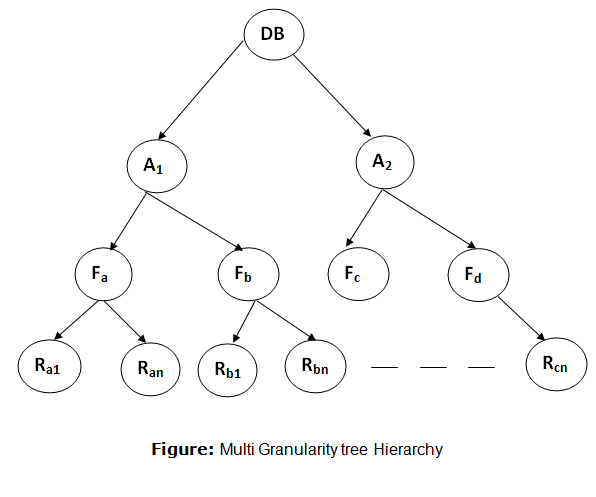
For example: Consider a tree which has four levels of nodes.

  • The first level or higher level shows the entire database.
  • The second level represents a node of type area. The higher level database consists of exactly these areas.
  • The area consists of children nodes which are known as files. No file can be present in more than one area.
  • Finally, each file contains child nodes known as records. The file has exactly those records that are its child nodes. No records represent in more than one file.
  • Hence, the levels of the tree starting from the top level are as follows:
    1. Database
    2. Area
    3. File
    4. Record


DBMS Multiple Granularity

In this example, the highest level shows the entire database. The levels below are file, record, and fields.

There are three additional lock modes with multiple granularity:

Intention Mode Lock

Intention-shared (IS): It contains explicit locking at a lower level of the tree but only with shared locks.

Intention-Exclusive (IX): It contains explicit locking at a lower level with exclusive or shared locks.

Shared & Intention-Exclusive (SIX): In this lock, the node is locked in shared mode, and some node is locked in exclusive mode by the same transaction.

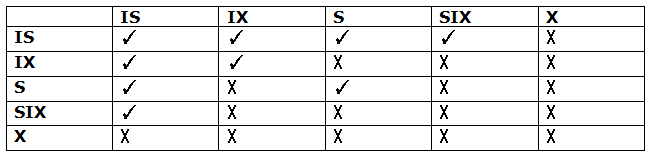
Compatibility Matrix with Intention Lock Modes: The below table describes the compatibility matrix for these lock modes:


DBMS Multiple Granularity

It uses the intention lock modes to ensure serializability. It requires that if a transaction attempts to lock a node, then that node must follow these protocols:

  • Transaction T1 should follow the lock-compatibility matrix.
  • Transaction T1 firstly locks the root of the tree. It can lock it in any mode.
  • If T1 currently has the parent of the node locked in either IX or IS mode, then the transaction T1 will lock a node in S or IS mode only.
  • If T1 currently has the parent of the node locked in either IX or SIX modes, then the transaction T1 will lock a node in X, SIX, or IX mode only.
  • If T1 has not previously unlocked any node only, then the Transaction T1 can lock a node.
  • If T1 currently has none of the children of the node-locked only, then Transaction T1 will unlock a node.

Observe that in multiple-granularity, the locks are acquired in top-down order, and locks must be released in bottom-up order.

  • If transaction T1 reads record Ra9 in file Fa, then transaction T1 needs to lock the database, area A1 and file Fa in IX mode. Finally, it needs to lock Ra2 in S mode.
  • If transaction T2 modifies record Ra9 in file Fa, then it can do so after locking the database, area A1 and file Fa in IX mode. Finally, it needs to lock the Ra9 in X mode.
  • If transaction T3 reads all the records in file Fa, then transaction T3 needs to lock the database, and area A in IS mode. At last, it needs to lock Fa in S mode.
  • If transaction T4 reads the entire database, then T4 needs to lock the database in S mode.

Labels: ,

Thomas write Rule

Thomas write Rule

Thomas Write Rule provides the guarantee of serializability order for the protocol. It improves the Basic Timestamp Ordering Algorithm.

The basic Thomas write rules are as follows:

  • If TS(T) < R_TS(X) then transaction T is aborted and rolled back, and operation is rejected.
  • If TS(T) < W_TS(X) then don't execute the W_item(X) operation of the transaction and continue processing.
  • If neither condition 1 nor condition 2 occurs, then allowed to execute the WRITE operation by transaction Ti and set W_TS(X) to TS(T).

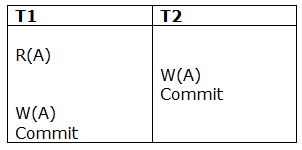
If we use the Thomas write rule then some serializable schedule can be permitted that does not conflict serializable as illustrate by the schedule in a given figure:


DBMS Thomas write Rule

Figure: A Serializable Schedule that is not Conflict Serializable

In the above figure, T1's read and precedes T1's write of the same data item. This schedule does not conflict serializable.

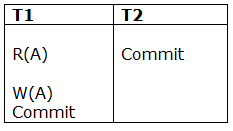
Thomas write rule checks that T2's write is never seen by any transaction. If we delete the write operation in transaction T2, then conflict serializable schedule can be obtained which is shown in below figure.


DBMS Thomas write Rule

Figure: A Conflict Serializable Schedule

Labels: ,