πŸŽ“ Computer Science & Engineering Portal

Master Engineering Disciplines with Structured Notes

Comprehensive academic lecture notes, exam-oriented unit summaries, laboratory manuals, and previous year question papers designed strictly for university students.

πŸ“‘

University Syllabi

AKTU & AICTE aligned semester guidelines.

πŸ“

Exam Question Papers

Previous 5 years solved university papers.

πŸ’‘

Lab Manuals & Viva

Practical codes with outputs & interview Qs.

Core Subjects & Units Hub

Click on any specific unit to immediately view its lecture notes below

Viewing All Lectures

Protection in File System

In computer systems, alot of user’s information is stored, the objective of the operating system is to keep safe the data of the user from the improper access to the system. Protection can be provided in number of ways. For a single laptop system, we might provide protection by locking the computer in a desk drawer or file cabinet. For multi-user systems, different mechanisms are used for the protection.

Types of Access :
The files which have direct access of the any user have the need of protection. The files which are not accessible to other users doesn’t require any kind of protection. The mechanism of the protection provide the facility of the controlled access by just limiting the types of access to the file. Access can be given or not given to any user depends on several factors, one of which is the type of access required. Several different types of operations can be controlled:

  • Read –
    Reading from a file.
  • Write –
    Writing or rewriting the file.
  • Execute –
    Loading the file and after loading the execution process starts.
  • Append –
    Writing the new information to the already existing file, editing must be end at the end of the existing file.
  • Delete –
    Deleting the file which is of no use and using its space for the another data.
  • List –
    List the name and attributes of the file.

Operations like renaming, editing the existing file, copying; these can also be controlled. There are many protection mechanism. each of them mechanism have different advantages and disadvantages and must be appropriate for the intended application.

Access Control :
There are different methods used by different users to access any file. The general way of protection is to associate identity-dependent access with all the files and directories an list called access-control list (ACL) which specify the names of the users and the types of access associate with each of the user. The main problem with the access list is their length. If we want to allow everyone to read a file, we must list all the users with the read access. This technique has two undesirable consequences:

Constructing such a list may be tedious and unrewarding task, especially if we do not know in advance the list of the users in the system.


Previously, the entry of the any directory is of the fixed size but now it changes to the variable size which results in the complicates space management. These problems can be resolved by use of a condensed version of the access list. To condense the length of the access-control list, many systems recognize three classification of users in connection with each file:

  • Owner –
    Owner is the user who has created the file.
  • Group –
    A group is a set of members who has similar needs and they are sharing the same file.
  • Universe –
    In the system, all other users are under the category called universe.

The most common recent approach is to combine access-control lists with the normal general owner, group, and universe access control scheme. For example: Solaris uses the three categories of access by default but allows access-control lists to be added to specific files and directories when more fine-grained access control is desired.

Other Protection Approaches:
The access to any system is also controlled by the password. If the use of password are is random and it is changed often, this may be result in limit the effective access to a file.
The use of passwords has a few disadvantages:

  • The number of passwords are very large so it is difficult to remember the large passwords.
  • If one password is used for all the files, then once it is discovered, all files are accessible; protection is on all-or-none basis.

Labels: ,

File Allocation Methods

The allocation methods define how the files are stored in the disk blocks. There are three main disk space or file allocation methods.

  • Contiguous Allocation
  • Linked Allocation
  • Indexed Allocation

The main idea behind these methods is to provide:

  • Efficient disk space utilization.
  • Fast access to the file blocks.

All the three methods have their own advantages and disadvantages as discussed below:

1. Contiguous Allocation

In this scheme, each file occupies a contiguous set of blocks on the disk. For example, if a file requires n blocks and is given a block b as the starting location, then the blocks assigned to the file will be: b, b+1, b+2,……b+n-1. This means that given the starting block address and the length of the file (in terms of blocks required), we can determine the blocks occupied by the file.
The directory entry for a file with contiguous allocation contains

  • Address of starting block
  • Length of the allocated portion.

The file β€˜mail’ in the following figure starts from the block 19 with length = 6 blocks. Therefore, it occupies 19, 20, 21, 22, 23, 24 blocks.

Figure - Contiguous allocation of disk space.


Advantages:

  • Both the Sequential and Direct Accesses are supported by this. For direct access, the address of the kth block of the file which starts at block b can easily be obtained as (b+k).
  • This is extremely fast since the number of seeks are minimal because of contiguous allocation of file blocks.

Disadvantages:

  • This method suffers from both internal and external fragmentation. This makes it inefficient in terms of memory utilization.
  • Increasing file size is difficult because it depends on the availability of contiguous memory at a particular instance.

2. Linked List Allocation

In this scheme, each file is a linked list of disk blocks which need not be contiguous. The disk blocks can be scattered anywhere on the disk.
The directory entry contains a pointer to the starting and the ending file block. Each block contains a pointer to the next block occupied by the file.

The file β€˜jeep’ in following image shows how the blocks are randomly distributed. The last block (25) contains -1 indicating a null pointer and does not point to any other block.


Figure - Linked allocation of disk space.


Advantages:

  • This is very flexible in terms of file size. File size can be increased easily since the system does not have to look for a contiguous chunk of memory.
  • This method does not suffer from external fragmentation. This makes it relatively better in terms of memory utilization.

Disadvantages:

  • Because the file blocks are distributed randomly on the disk, a large number of seeks are needed to access every block individually. This makes linked allocation slower.
  • It does not support random or direct access. We can not directly access the blocks of a file. A block k of a file can be accessed by traversing k blocks sequentially (sequential access ) from the starting block of the file via block pointers.
  • Pointers required in the linked allocation incur some extra overhead.

3. Indexed Allocation

In this scheme, a special block known as the Index block contains the pointers to all the blocks occupied by a file. Each file has its own index block. The ith entry in the index block contains the disk address of the ith file block. The directory entry contains the address of the index block as shown in the image:
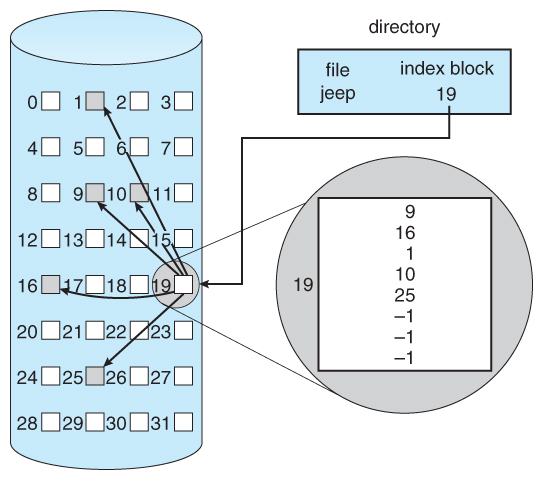


Figure - Indexed allocation of disk space.
Advantages:

  • This supports direct access to the blocks occupied by the file and therefore provides fast access to the file blocks.
  • It overcomes the problem of external fragmentation.

Disadvantages:

  • The pointer overhead for indexed allocation is greater than linked allocation.
  • For very small files, say files that expand only 2-3 blocks, the indexed allocation would keep one entire block (index block) for the pointers which is inefficient in terms of memory utilization. However, in linked allocation we lose the space of only 1 pointer per block.

For files that are very large, single index block may not be able to hold all the pointers.
Following mechanisms can be used to resolve this:

  1. Linked scheme: This scheme links two or more index blocks together for holding the pointers. Every index block would then contain a pointer or the address to the next index block.
  2. Multilevel index: In this policy, a first level index block is used to point to the second level index blocks which inturn points to the disk blocks occupied by the file. This can be extended to 3 or more levels depending on the maximum file size.
  3. Combined Scheme: In this scheme, a special block called the Inode (information Node) contains all the information about the file such as the name, size, authority, etc and the remaining space of Inode is used to store the Disk Block addresses which contain the actual file as shown in the image below. The first few of these pointers in Inode point to the direct blocks i.e the pointers contain the addresses of the disk blocks that contain data of the file. The next few pointers point to indirect blocks. Indirect blocks may be single indirect, double indirect or triple indirect. Single Indirect block is the disk block that does not contain the file data but the disk address of the blocks that contain the file data. Similarly, double indirect blocks do not contain the file data but the disk address of the blocks that contain the address of the blocks containing the file data.

  4. Figure - The UNIX inode.

Labels: ,

File System Implementation

A file is a collection of related information. The file system resides on secondary storage and provides efficient and convenient access to the disk by allowing data to be stored, located, and retrieved.

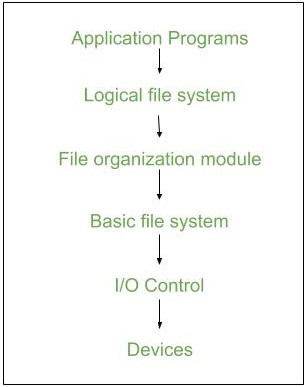
File system organized in many layers :

  • I/O Control level –
    Device drivers acts as interface between devices and Os, they help to transfer data between disk and main memory. It takes block number a input and as output it gives low level hardware specific instruction.
    /li>
  • Basic file system –
    It Issues general commands to device driver to read and write physical blocks on disk.It manages the memory buffers and caches. A block in buffer can hold the contents of the disk block and cache stores frequently used file system metadata.
  • File organization Module –
    It has information about files, location of files and their logical and physical blocks.Physical blocks do not match with logical numbers of logical block numbered from 0 to N. It also has a free space which tracks unallocated blocks.
  • Logical file system –
    It manages metadata information about a file i.e includes all details about a file except the actual contents of file. It also maintains via file control blocks. File control block (FCB) has information about a file – owner, size, permissions, location of file contents.

Advantages :

  1. Duplication of code is minimized.
  2. Each file system can have its own logical file system.

Disadvantages :
If we access many files at same time then it results in low performance.

We can implement file system by using two types data structures :

    1. On-disk Structures –
    Generally they contain information about total number of disk blocks, free disk blocks, location of them and etc. Below given are different on-disk structures :
    1. Boot Control Block –
      It is usually the first block of volume and it contains information needed to boot an operating system.In UNIX it is called boot block and in NTFS it is called as partition boot sector.
    2. Volume Control Block –
      It has information about a particular partition ex:- free block count, block size and block pointers etc.In UNIX it is called super block and in NTFS it is stored in master file table.
    3. Directory Structure –
      They store file names and associated inode numbers.In UNIX, includes file names and associated file names and in NTFS, it is stored in master file table.
    4. Per-File FCB –
      It contains details about files and it has a unique identifier number to allow association with directory entry. In NTFS it is stored in master file table.

    2. In-Memory Structure :
    They are maintained in main-memory and these are helpful for file system management for caching. Several in-memory structures given below :

    1. Mount Table –
      It contains information about each mounted volume.
    2. Directory-Structure cache –
      This cache holds the directory information of recently accessed directories.
    3. System wide open-file table –
      It contains the copy of FCB of each open file.
    4. Per-process open-file table –
      It contains information opened by that particular process and it maps with appropriate system wide open-file.

    Directory Implementation :

    1. Linear List –
      It maintains a linear list of filenames with pointers to the data blocks.It is time-consuming also.To create a new file, we must first search the directory to be sure that no existing file has the same name then we add a file at end of the directory.To delete a file, we search the directory for the named file and release the space.To reuse the directory entry either we can mark the entry as unused or we can attach it to a list of free directories.
    2. Hash Table –
      The hash table takes a value computed from the file name and returns a pointer to the file. It decreases the directory search time. The insertion and deletion process of files is easy. The major difficulty is hash tables are its generally fixed size and hash tables are dependent on hash function on that size.

Labels: ,

File sharing

File sharing is the practice of sharing or offering access to digital information or resources, including documents, multimedia (audio/video), graphics, computer programs, images and e-books. It is the private or public distribution of data or resources in a network with different levels of sharing privileges.


File sharing can be done using several methods. The most common techniques for file storage, distribution and transmission include the following:

  • Removable storage devices
  • Centralized file hosting server installations on networks
  • World Wide Web-oriented hyperlinked documents
  • Distributed peer-to-peer networks
File sharing is a multipurpose computer service feature that evolved from removable media via network protocols, such as File Transfer Protocol (FTP). Beginning in the 1990s, many remote file-sharing mechanisms were introduced, including FTP, hotline and Internet relay chat (IRC).

Operating systems also provide file-sharing methods, such as network file sharing (NFS). Most file-sharing tasks use two basic sets of network criteria, as follows:
  • Peer-to-Peer (P2P) File Sharing: This is the most popular, but controversial, method of file sharing because of the use of peer-to-peer software. Network computer users locate shared data with third-party software. P2P file sharing allows users to directly access, download and edit files. Some third-party software facilitates P2P sharing by collecting and segmenting large files into smaller pieces.
  • File Hosting Services: This P2P file-sharing alternative provides a broad selection of popular online material. These services are quite often used with Internet collaboration methods, including email, blogs, forums, or other mediums, where direct download links from the file hosting services can be included. These service websites usually host files to enable users to download them.

Once users download or make use of a file using a file-sharing network, their computer also becomes a part of that network, allowing other users to download files from the user's computer. File sharing is generally illegal, with the exception of sharing material that is not copyrighted or proprietary. Another issue with file-sharing applications is the problem of spyware or adware, as some file-sharing websites have placed spyware programs in their websites. These spyware programs are often installed on users' computers without their consent and awareness.

Labels: ,

File Directories

A directory is a container that is used to contain folders and files. It organizes files and folders in a hierarchical manner. 

There are several logical structures of a directory, these are given below.  

  • Single-level directory – 
    The single-level directory is the simplest directory structure. In it, all files are contained in the same directory which makes it easy to support and understand. 

    A single level directory has a significant limitation, however, when the number of files increases or when the system has more than one user. Since all the files are in the same directory, they must have a unique name. if two users call their dataset test, then the unique name rule violated. 

Advantages: 


  • Since it is a single directory, so its implementation is very easy. 
  • If the files are smaller in size, searching will become faster. 
  • The operations like file creation, searching, deletion, updating are very easy in such a directory structure. 

Disadvantages:

  • There may chance of name collision because two files can not have the same name. 
  • Searching will become time taking if the directory is large. 
  • This can not group the same type of files together. 
  • Two-level directory – 
    As we have seen, a single level directory often leads to confusion of files names among different users. the solution to this problem is to create a separate directory for each user. 

    In the two-level directory structure, each user has their own user files directory (UFD). The UFDs have similar structures, but each lists only the files of a single user. system’s master file directory (MFD) is searches whenever a new user id=s logged in. The MFD is indexed by username or account number, and each entry points to the UFD for that user. 

Advantages: 

  • We can give full path like /User-name/directory-name/. 
  • Different users can have the same directory as well as the file name. 
  • Searching of files becomes easier due to pathname and user-grouping. 

Disadvantages:

  • A user is not allowed to share files with other users. 
  • Still, it not very scalable, two files of the same type cannot be grouped together in the same user. 
     
  • Tree-structured directory – 
    Once we have seen a two-level directory as a tree of height 2, the natural generalization is to extend the directory structure to a tree of arbitrary height. 
    This generalization allows the user to create their own subdirectories and to organize their files accordingly. 

A tree structure is the most common directory structure. The tree has a root directory, and every file in the system has a unique path. 

Advantages: 

  • Very general, since full pathname can be given. 
  • Very scalable, the probability of name collision is less. 
  • Searching becomes very easy, we can use both absolute paths as well as relative.

Disadvantages: 

  • Every file does not fit into the hierarchical model, files may be saved into multiple directories. 
  • We can not share files. 
  • It is inefficient, because accessing a file may go under multiple directories. 
     
  • Acyclic graph directory – 
    An acyclic graph is a graph with no cycle and allows us to share subdirectories and files. The same file or subdirectories may be in two different directories. It is a natural generalization of the tree-structured directory. 

    It is used in the situation like when two programmers are working on a joint project and they need to access files. The associated files are stored in a subdirectory, separating them from other projects and files of other programmers since they are working on a joint project so they want the subdirectories to be into their own directories. The common subdirectories should be shared. So here we use Acyclic directories. 

    It is the point to note that the shared file is not the same as the copy file. If any programmer makes some changes in the subdirectory it will reflect in both subdirectories. 

Advantages: 

  • We can share files. 
  • Searching is easy due to different-different paths. 

Disadvantages:

  • We share the files via linking, in case deleting it may create the problem, 
  • If the link is a soft link then after deleting the file we left with a dangling pointer. 
  • In the case of a hard link, to delete a file we have to delete all the references associated with it. 
     
  • General graph directory structure – 
    In general graph directory structure, cycles are allowed within a directory structure where multiple directories can be derived from more than one parent directory. 
    The main problem with this kind of directory structure is to calculate the total size or space that has been taken by the files and directories. 
     

Advantages: 

  • It allows cycles. 
  • It is more flexible than other directories structure. 

Disadvantages:

  • It is more costly than others. 
  • It needs garbage collection. 

Labels: ,

File Access Mechanism

The allocation methods define how the files are stored in the disk blocks. There are three main disk space or file allocation methods.

  • Contiguous Allocation
  • Linked Allocation
  • Indexed Allocation

The main idea behind these methods is to provide:

  • Efficient disk space utilization.
  • Fast access to the file blocks.

All the three methods have their own advantages and disadvantages as discussed below:

1. Contiguous Allocation

In this scheme, each file occupies a contiguous set of blocks on the disk. For example, if a file requires n blocks and is given a block b as the starting location, then the blocks assigned to the file will be: b, b+1, b+2,……b+n-1. This means that given the starting block address and the length of the file (in terms of blocks required), we can determine the blocks occupied by the file.
The directory entry for a file with contiguous allocation contains

  • Address of starting block
  • Length of the allocated portion.

The file β€˜mail’ in the following figure starts from the block 19 with length = 6 blocks. Therefore, it occupies 19, 20, 21, 22, 23, 24 blocks.

Figure - Contiguous allocation of disk space.


Advantages:

  • Both the Sequential and Direct Accesses are supported by this. For direct access, the address of the kth block of the file which starts at block b can easily be obtained as (b+k).
  • This is extremely fast since the number of seeks are minimal because of contiguous allocation of file blocks.

Disadvantages:

  • This method suffers from both internal and external fragmentation. This makes it inefficient in terms of memory utilization.
  • Increasing file size is difficult because it depends on the availability of contiguous memory at a particular instance.

2. Linked List Allocation

In this scheme, each file is a linked list of disk blocks which need not be contiguous. The disk blocks can be scattered anywhere on the disk.
The directory entry contains a pointer to the starting and the ending file block. Each block contains a pointer to the next block occupied by the file.

The file β€˜jeep’ in following image shows how the blocks are randomly distributed. The last block (25) contains -1 indicating a null pointer and does not point to any other block.


Figure - Linked allocation of disk space.


Advantages:

  • This is very flexible in terms of file size. File size can be increased easily since the system does not have to look for a contiguous chunk of memory.
  • This method does not suffer from external fragmentation. This makes it relatively better in terms of memory utilization.

Disadvantages:

  • Because the file blocks are distributed randomly on the disk, a large number of seeks are needed to access every block individually. This makes linked allocation slower.
  • It does not support random or direct access. We can not directly access the blocks of a file. A block k of a file can be accessed by traversing k blocks sequentially (sequential access ) from the starting block of the file via block pointers.
  • Pointers required in the linked allocation incur some extra overhead.

3. Indexed Allocation

In this scheme, a special block known as the Index block contains the pointers to all the blocks occupied by a file. Each file has its own index block. The ith entry in the index block contains the disk address of the ith file block. The directory entry contains the address of the index block as shown in the image:


Figure - Indexed allocation of disk space.
Advantages:

  • This supports direct access to the blocks occupied by the file and therefore provides fast access to the file blocks.
  • It overcomes the problem of external fragmentation.

Disadvantages:

  • The pointer overhead for indexed allocation is greater than linked allocation.
  • For very small files, say files that expand only 2-3 blocks, the indexed allocation would keep one entire block (index block) for the pointers which is inefficient in terms of memory utilization. However, in linked allocation we lose the space of only 1 pointer per block.

For files that are very large, single index block may not be able to hold all the pointers.
Following mechanisms can be used to resolve this:

  1. Linked scheme: This scheme links two or more index blocks together for holding the pointers. Every index block would then contain a pointer or the address to the next index block.
  2. Multilevel index: In this policy, a first level index block is used to point to the second level index blocks which inturn points to the disk blocks occupied by the file. This can be extended to 3 or more levels depending on the maximum file size.
  3. Combined Scheme: In this scheme, a special block called the Inode (information Node) contains all the information about the file such as the name, size, authority, etc and the remaining space of Inode is used to store the Disk Block addresses which contain the actual file as shown in the image below. The first few of these pointers in Inode point to the direct blocks i.e the pointers contain the addresses of the disk blocks that contain data of the file. The next few pointers point to indirect blocks. Indirect blocks may be single indirect, double indirect or triple indirect. Single Indirect block is the disk block that does not contain the file data but the disk address of the blocks that contain the file data. Similarly, double indirect blocks do not contain the file data but the disk address of the blocks that contain the address of the blocks containing the file data.

  4. Figure - The UNIX inode.

Labels: ,