Wednesday, June 30, 2021

TCP Congestion Control

TCP reacts to congestion by reducing the sender window size.

The size of the sender window is determined by the following two factors-

  1. Receiver window size
  2. Congestion window size 

1. Receiver Window Size-

 Receiver window size is an advertisement of- “How much data (in bytes) the receiver can receive without acknowledgement?”

  • Sender should not send data greater than receiver window size.
  • Otherwise, it leads to dropping the TCP segments which causes TCP Retransmission.
  • So, sender should always send data less than or equal to receiver window size.
  • Receiver dictates its window size to the sender through TCP Header.

2. Congestion Window- 

  • Sender should not send data greater than congestion window size.
  • Otherwise, it leads to dropping the TCP segments which causes TCP Retransmission.
  • So, sender should always send data less than or equal to congestion window size.
  • Different variants of TCP use different approaches to calculate the size of congestion window.
  • Congestion window is known only to the sender and is not sent over the links.


So, always- 

Sender window size = Minimum (Receiver window size, Congestion window size)


TCP Congestion Policy- 

TCP’s general policy for handling congestion consists of following three phases- 
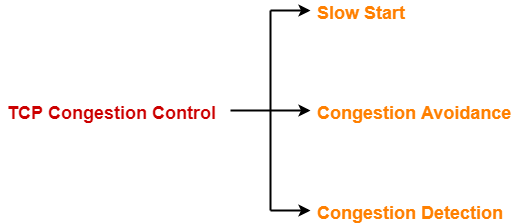
  1. Slow Start
  2. Congestion Avoidance
  3. Congestion Detection


1. Slow Start Phase- 

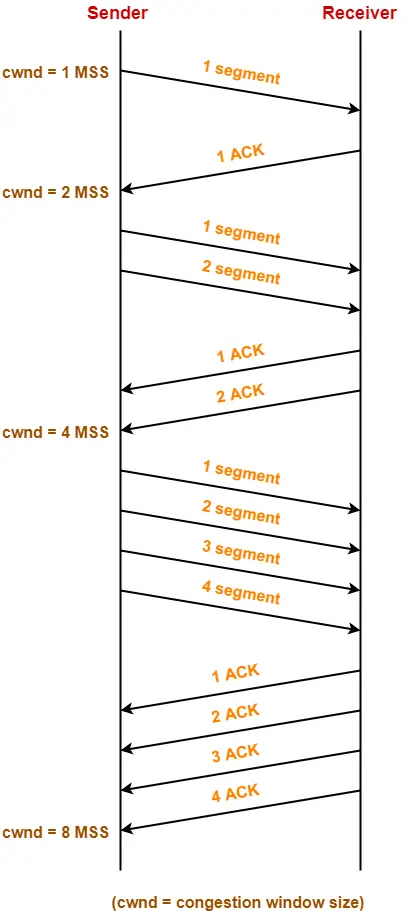
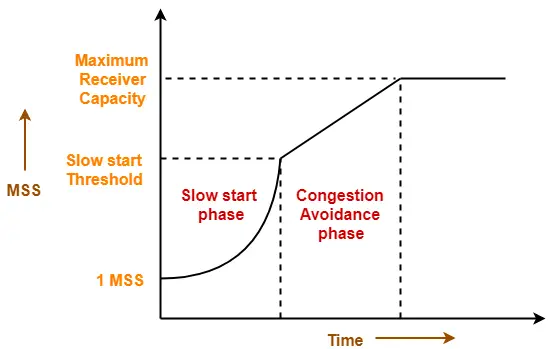
  • Initially, sender sets congestion window size = Maximum Segment Size (1 MSS).
  • After receiving each acknowledgment, sender increases the congestion window size by 1 MSS.
  • In this phase, the size of congestion window increases exponentially.


The followed formula is- 

Congestion window size = Congestion window size + Maximum segment size 

This is shown below-


  • After 1 round trip time, congestion window size = 21 = 2 MSS
  • After 2 round trip time, congestion window size =22 = 4 MSS
  • After 3 round trip time, congestion window size = 23 = 8 MSS and so on.
This phase continues until the congestion window size reaches the slow start threshold. 

Threshold = Maximum number of TCP segments that receiver window can accommodate / 2

= (Receiver window size / Maximum Segment Size) / 2


 2. Congestion Avoidance Phase- 

After reaching the threshold,

  • Sender increases the congestion window size linearly to avoid the congestion.
  • On receiving each acknowledgement, sender increments the congestion window size by 1.


The followed formula is-

 Congestion window size = Congestion window size + 1

This phase continues until the congestion window size becomes equal to the receiver window size.
 3. Congestion Detection Phase- 

When sender detects the loss of segments, it reacts in different ways depending on how the loss is detected-

Case-01: Detection On Time Out- 

  • Time Out Timer expires before receiving the acknowledgement for a segment.
  • This case suggests the stronger possibility of congestion in the network.
  • There are chances that a segment has been dropped in the network.

 Reaction- 

In this case, sender reacts by-

  • Setting the slow start threshold to half of the current congestion window size.
  • Decreasing the congestion window size to 1 MSS.
  • Resuming the slow start phase.

 Case-02: Detection On Receiving 3 Duplicate Acknowledgements-

  • Sender receives 3 duplicate acknowledgements for a segment.
  • This case suggests the weaker possibility of congestion in the network.
  • There are chances that a segment has been dropped but few segments sent later may have reached.

 Reaction- 

In this case, sender reacts by-

  • Setting the slow start threshold to half of the current congestion window size.
  • Decreasing the congestion window size to slow start threshold.
  • Resuming the congestion avoidance phase.

Discuss the quality of service parameters in computer network.

The various Quality of Service (QoS) parameters in Computer Network are as follows:

  1. Cell Loss Rate (CLR)

    It is the fraction of cells that are lost during transmission.

    CLR = Cell Lost / Total cells transmitted

  2. Cell Delay Variation (CDV)

    It defines the difference between the maximum and the minimum cell transfer delay.

  3. Cell Transfer Delay (CTD)

  4. It is the average time required for cell to travel from source to destination.

  5. Cell transfer delay is affected by segmentation reassembly and transmission delay.

  6. Cell Error Ratio (CER)

    This parameter defines the fraction of cells that contained errors.

    CER = Error cells delivered / Total cells delivered

  7. Cell Mis-insertion Ratio (CMR)

    It is the number of cells inserted per second that are meant for some other destination.

  8. It is the ratio of severely error cell blocks to the total transmitted cell blocks.

    SECBR = Severely Error Cell Blocks / Total transmitted cell blocks

The factors affecting the QoS parameters are:

  • Propagation Delay

  • Capacity of Buffer

  • Traffic Load

  • Allocation of resources

  • Architecture of switch present in network

  • Media error statistics

The QoS is determined by four parameters:

i. Reliability

ii. Delay

iii. Jitter

iv. Bandwidth

Technique to achieve Good QoS:

  1. Over Provisioning: Excess of router capacity, buffer space and bandwidth is provided so that packets fly through easily.
  2. Buffering: It smooths out jitter and does not affect reliability or bandwidth. It increases delay.
  3. Traffic Shaping: It forces bursty traffic to be transmitted at a uniform rate.
  4. Resource Reservation: In this bandwidth, buffer space and CPU cycles needed for successful transmission are reserved beforehand.
  5. Admission Control: In this a router decides, depending on its current load, whether it should accept or reject a new job.
  6. Proportional Routing: In this, traffic is divided equally amongst all routers so that no single router gets overburdened.

Packet Scheduling: Queuing is used so that an aggressive sender does not block all the lines.

Labels: ,

Window Management

  • Window management in TCP decouples the issues of acknowledgement of the correct receipt of segments and receiver buffer allocation.
  • For example, suppose the receiver has a 4096-byte buffer, as shown in Fig. below. If the sender transmits a 2048-byte segment that is correctly received, the receiver will acknowledge the segment. However, since it now has only 2048 bytes of buffer space (until the application removes some data from the buffer), it will advertise a window of 2048 starting at the next byte expected.

  • Now the sender transmits another 2048 bytes, which are acknowledged, but the advertised window is of size 0. The sender must stop until the application process on the receiving host has removed some data from the buffer, at which time TCP can advertise a larger window and more data can be sent.
  • When the window is 0, the sender may not normally send segments, with two exceptions. First, urgent data may be sent, for example, to allow the user to kill the process running on the remote machine. Second, the sender may send a 1-byte segment to force the receiver to reannounce the next byte expected and the window size. This packet is called a window probe.
  • The TCP standard explicitly provides this option to prevent deadlock if a window update ever gets lost.
  • Senders are not required to transmit data as soon as they come in from the application.
  • Neither are receivers required to send acknowledgements as soon as possible. For example, in Fig. above, when the first 2 KB of data came in, TCP, knowing that it had a 4-KB window, would have been completely correct in just buffering the data until another 2 KB came in, to be able to transmit a segment with a 4-KB payload. This freedom can be used to improve performance.
  • Consider a connection to a remote terminal, for example using SSH or telnet, that reacts on every keystroke. In the worst case, whenever a character arrives at the sending TCP entity, TCP creates a 21-byte TCP segment, which it gives to IP to send as a 41-byte IP datagram.
  • At the receiving side, TCP immediately sends a 40-byte acknowledgement (20 bytes of TCP header and 20 bytes of IP header).
  • Later, when the remote terminal has read the byte, TCP sends a window update, moving the window 1 byte to the right. This packet is also 40 bytes. Finally, when the remote terminal has processed the character, it echoes the character for local display using a 41-byte packet.
  • In all, 162 bytes of bandwidth are used and four segments are sent for each character typed. When bandwidth is scarce, this method of doing business is not desirable.

Labels: ,

TCP Flow Control and retransmission

The TCP retransmission means resending the packets over the network that have been either lost or damaged. Here, retransmission is a mechanism used by protocols such as TCP to provide reliable communication. Here, reliable communication means that the protocol guarantees packet's delivery even if the data packet has been lost or damaged.

The networks are unreliable and do not guarantee the delay or the retransmission of the lost or damaged packets. The network which uses a combination of acknowledgment and retransmission of damaged or lost packets offers reliability.

Retransmission mechanism

Here, retransmission means the data packets have been lost, which leads to a lack of acknowledgment. This lack of acknowledgment triggers a timer to timeout, which leads to the retransmission of data packets. Here, the timer means that if no acknowledgment is received before the timer expires, the data packet is retransmitted.

Let's consider the following scenarios of retransmission.

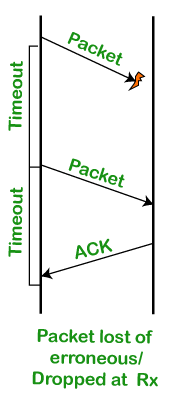
Scenario 1: When the data packet is lost or erroneous.

TCP Retransmission

In this scenario, the packet is sent to the receiver, but no acknowledgment is received within that timeout period. When the timeout period expires, then the packet is resent again. When the packet is retransmitted, the acknowledgment is received. Once the acknowledgment is received, retransmission will not occur again.

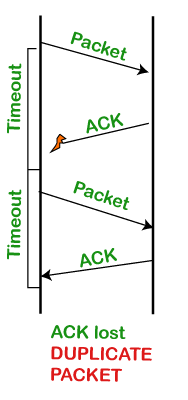
Scenario 2: When the packet is received but the acknowledgment is lost.

TCP Retransmission

In this scenario, the packet is received on the other side, but the acknowledgment is lost, i.e., the ACK is not received on the sender side. Once the timeout period expires, the packet is resent. There are two copies of the packets on the other side; though the packet is received correctly, the acknowledgment is not received, so the sender retransmits the packet. In this case, the retransmission could have been avoided, but due to the loss of the ACK, the packet is retransmitted.

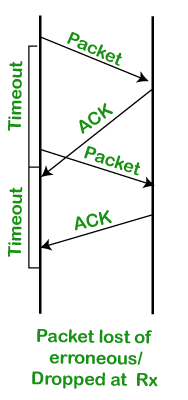
Scenario 3: When the early timeout occurs.

TCP Retransmission

In this scenario, the packet is sent, but due to the delay in acknowledgment or timeout has occurred before the actual timeout, the packet is retransmitted. In this case, the packet has been sent again unnecessarily due to the delay in acknowledgment or the timeout has been set earlier than the actual timeout. In the above scenarios, the first scenario cannot be avoided, but the other two scenarios can be avoided. Let's see how we can avoid these situations.

How long should the sender wait?

The sender sets the timeout period for an ACK. The timeout period can be of two types:

  • Too short: If the timeout period is too short, then the retransmissions will be wasted.
  • Too long: If the timeout period is too long, then there will be an excessive delay when the packet is lost.

In order to overcome the above two situations, TCP sets the timeout as a function of the RTT (round trip time) where round trip time is the time required for the packet to travel from the source to the destination and then come back again.

How can we obtain the RTT?

The RTT can vary depending upon the network's characteristics, i.e., if the network is congested, it means that the RTT is very high. We can estimate the RTT by simply watching the ACKs.

Let's see how we can measure the RTT.

We will use the original algorithm to measure the RTT.

Step 1: First, we measure the SampleRTT for each segment or ACK pair. When the sender sends the packet, then we know the timer at which the packet is sent, and also, we know the timer at which acknowledgment is received. Calculate the time between these two, and that becomes the SampleRTT.

Step 2: We will not take only one sample. We will keep on taking different samples and calculate the weighted average of these samples, and this becomes the EstRTT (Estimated RTT).

where, α+ β = 1

α lies between 0.8 and 0.9

β lies between 0.1 and 0.2

Step 3: The timeout is set based on EstRTT.

timeout = 2 * EstRTT.

The timeout is set to be twice the estimated RTT. This is how the actual timeout factor is calculated.

A Flaw in this approach

There is a flaw in the original algorithm. Let's consider two scenarios.

Scenario 1.

TCP Retransmission

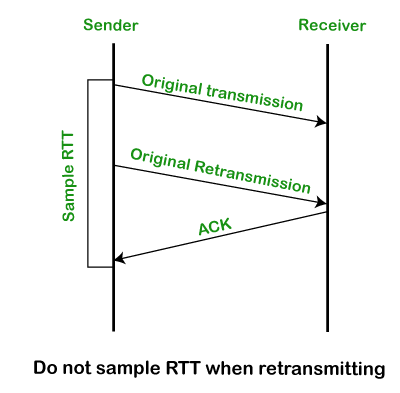
The above diagram shows that the sender sends the data, which is said to be an original transmission. Within the timeout period, no acknowledgment is received. So, the sender retransmits the data. After retransmitting the data, the acknowledgment is received. Let's assume that acknowledgment is received for the original transmission, not for the retransmission. Since we get the acknowledgment of the original transmission, so SampleRTT is calculated between the time of the original transmission and the time at which the acknowledgment is received. But actually, the SampleRTT should have been between the time of the retransmission and time of the acknowledgment.

Scenario 2.

TCP Retransmission

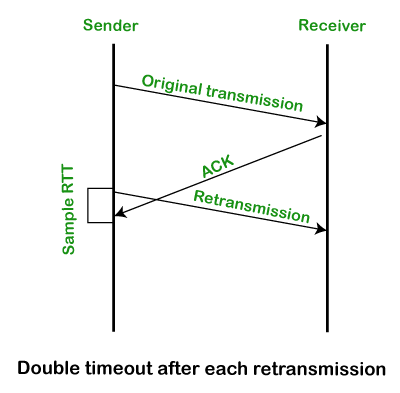
The above diagram shows that the sender sends the original data packet for which we get the acknowledgment also. But the acknowledgment is received after retransmitting the data. If we assume that acknowledgment belongs to the retransmission, then SampleRTT is calculated between the time of the retransmission and the time of the acknowledgment.

In the above both the scenarios, there is an ambiguity of not knowing whether the acknowledgment is for the original transmission or for the retransmission.

Conclusion of the above algorithm.

  • Here, ACK does not mean to acknowledge a transmission, but actually, it acknowledges a receipt of the data.
  • If we consider the first scenario, the retransmission is done for the lost packet. In this case, we are assuming that ACK belongs to the original transmission due to which the SampleRTT is coming out to be very large.
  • If we consider the second scenario, two same packets are sent so duplicity occurs in this case. In this case, we are assuming that ACK belongs to the retransmission due to which the SampleRTT is coming to be very small.

To overcome the above problems, a simple solution is given by the Karn/Partridge algorithm. This algorithm gave a simple solution that collects the samples sent at one time and does not consider the samples at the retransmission time for calculating the estimated RTT.

Labels: ,

TCP connection management(3-Way Handshake)

Transmission Control Protocol (TCP) provides a secure and reliable connection between two devices using the 3-way handshake process. TCP uses the full-duplex connection to synchronize (SYN) and acknowledge (ACK) each other on both sides. There are three steps for both establishing and closing a connection. They are − SYN, SYN-ACK, and ACK.

3-Way Handshake Connection Establishment Process

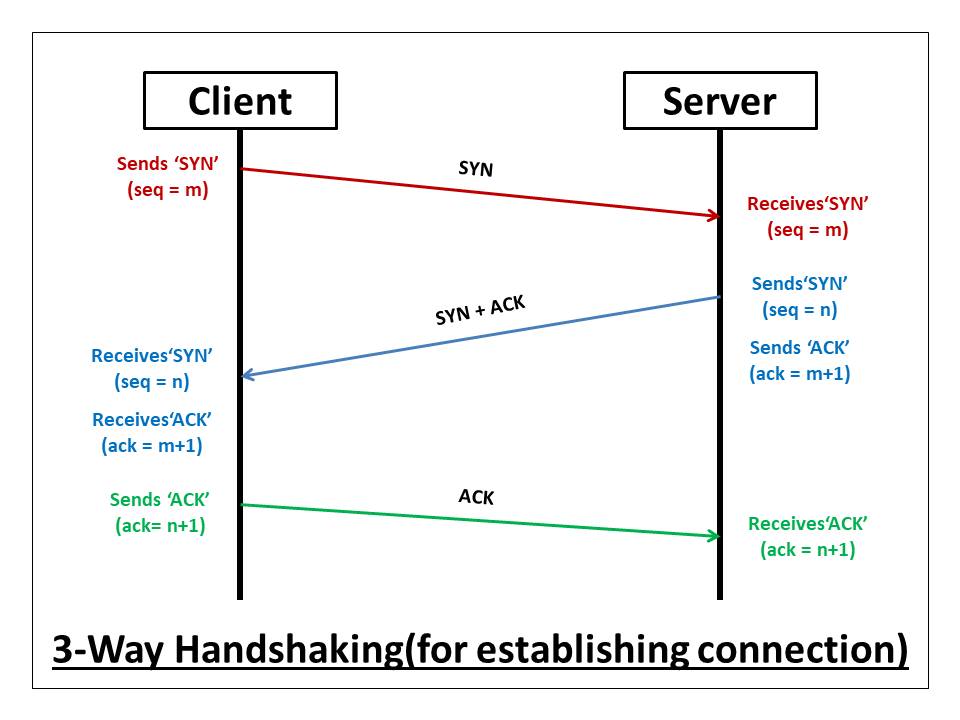
The following diagram shows how a reliable connection is established using 3-way handshake. It will support communication between a web browser on the client and server sides whenever a user navigates the Internet.

Synchronization Sequence Number (SYN) − The client sends the SYN to the server

  • When the client wants to connect to the server, then it sends the message to the server by setting the SYN flag as 1.
  • The message carries some additional information like the sequence number (32-bit random number).
  • The ACK is set to 0. The maximum segment size and the window size are also set. For example, if the window size is 1000 bits and the maximum segment size is 100 bits, then a maximum of 10 data segments can be transmitted in the connection by dividing (1000/100=10).

Synchronization and Acknowledgement (SYN-ACK) to the client

  • The server acknowledges the client request by setting the ACK flag to 1.
  • The ACK indicates the response of the segment it received and SYN indicates with what sequence number it will start the segments.
  • For example, if the client has sent the SYN with sequence number = 500, then the server will send the ACK using acknowledgment number = 5001.
  • The server will set the SYN flag to '1' and send it to the client if the server also wants to establish the connection.
  • The sequence number used for SYN will be different from the client's SYN.
  • The server also advertises its window size and maximum segment size to the client. And, the connection is established from the client-side to the server-side.

Acknowledgment (ACK) to the server

  • The client sends the acknowledgment (ACK) to the server after receiving the synchronization (SYN) from the server.
  • After getting the (ACK) from the client, the connection is established between the client and the server.
  • Now the data can be transmitted between the client and server sides.

3 -Way Handshake Closing Connection Process

To close a 3-way handshake connection,

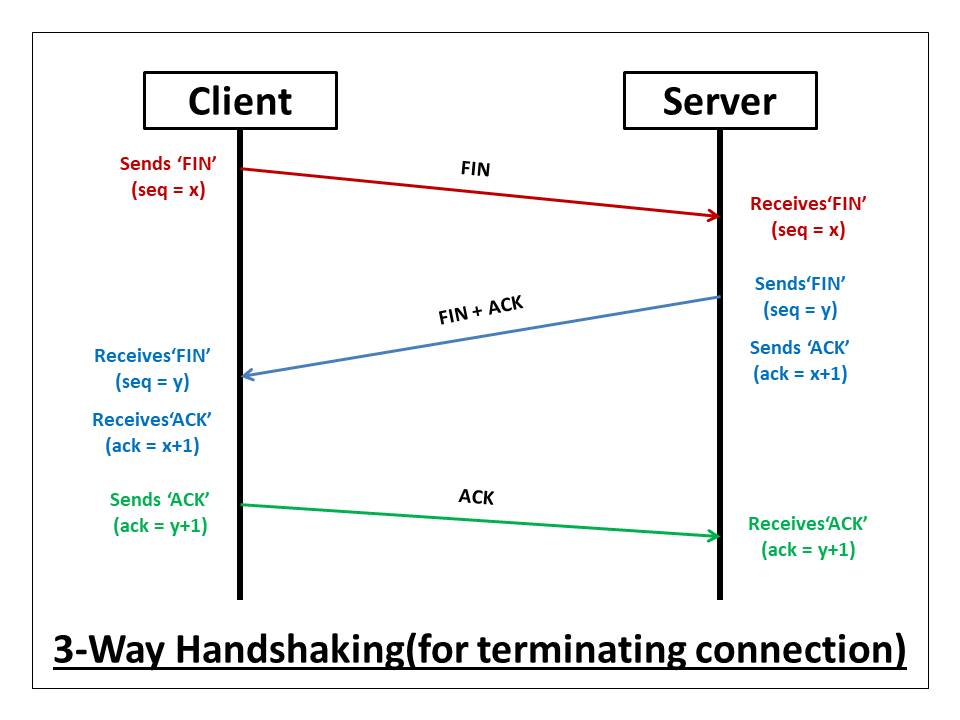
  • First, the client requests the server to terminate the established connection by sending FIN.
  • After receiving the client request, the server sends back the FIN and ACK request to the client.
  • After receiving the FIN + ACK from the server, the client confirms by sending an ACK to the server.

Labels: ,

Multiplexing

 Multiplexing –

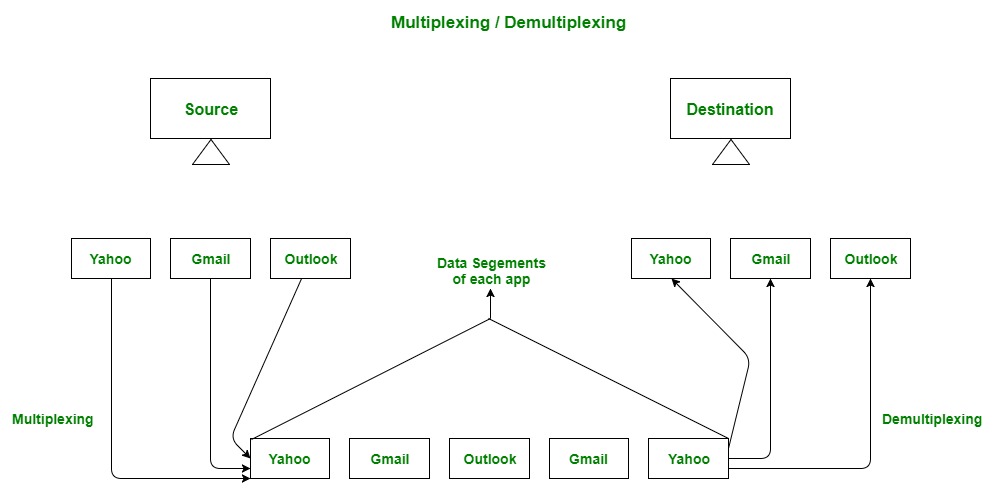
Gathering data from multiple application processes of sender, enveloping that data with header and sending them as a whole to the intended receiver is called as multiplexing.

Demultiplexing –
Delivering received segments at receiver side to the correct app layer processes is called as demultiplexing.

Figure – Abstract view of multiplexing and demultiplexing


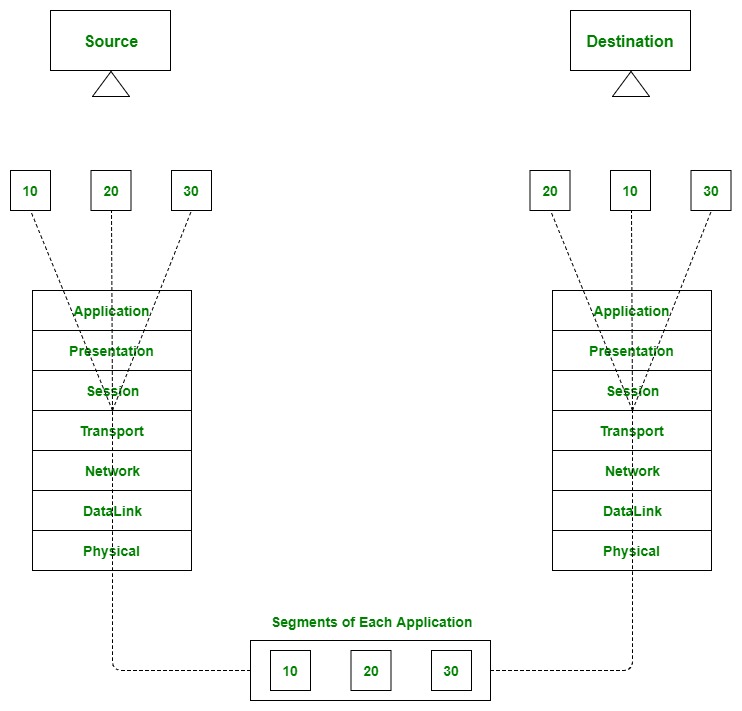
Multiplexing and demultiplexing are the services facilitated by the transport layer of OSI model.

Figure – Transport layer- junction for multiplexing and demultiplexing

There are two types of multiplexing and Demultiplexing :

  1. Connectionless Multiplexing and Demultiplexing
  2. Connection-Oriented Multiplexing and Demultiplexing

How Multiplexing and Demultiplexing is done –
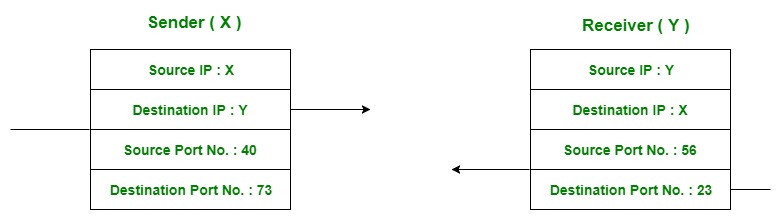
For sending data from an application at sender side to an application at the destination side, sender must know the IP address of destination and port number of the application (at the destination side) to which he want to transfer the data. Block diagram is shown below :

Figure – Transfer of packet between applications of sender and receiver

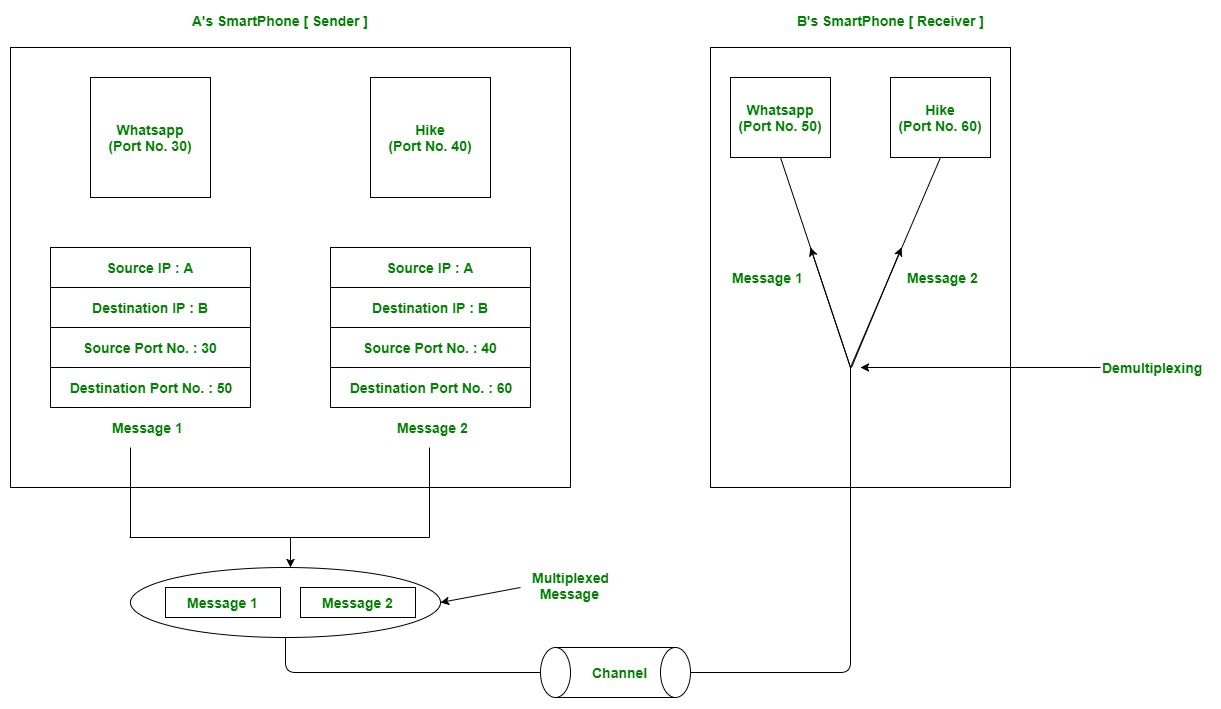
Let us consider two messaging apps that are widely used now a days viz. Hike and whatsapp. Suppose A is the sender and B is the receiver. Both sender and receiver have these applications installed in their system (say smartphone). Suppose A want to send messages to B in whatsapp and hike both. In order to do so, A must mention the IP address of B and destination port number of the whatsapp while sending the message through whatsapp application. Similarly, for the later case, A must mention the IP address of B and destination port number of the hike while sending the message.


Now the messages from both the apps will be wrapped up along with appropriate headers(viz. source IP address, destination IP address, source port no,destination port number) and sent as a single message to the receiver. This process is called multiplexing. At the destination, received message is unwrapped and constituent messages (viz messages from hike and whatsapp application) are sent to appropriate application by looking to the destination the port number. This process is called demultiplexing. Similarly, B can also transfer the messages to A.

Figure – Message transfer using whatsapp and hike messaging application

Labels: ,

Transport Layer Protocols

Transport Control Protocol (UDP):
  • TCP stands for Transmission Control Protocol.
  • It provides full transport layer services to applications.
  • It is a connection-oriented protocol means the connection established between both the ends of the transmission. For creating the connection, TCP generates a virtual circuit between sender and receiver for the duration of a transmission.

Features Of TCP protocol

  • Stream data transfer: TCP protocol transfers the data in the form of contiguous stream of bytes. TCP group the bytes in the form of TCP segments and then passed it to the IP layer for transmission to the destination. TCP itself segments the data and forward to the IP.
  • Reliability: TCP assigns a sequence number to each byte transmitted and expects a positive acknowledgement from the receiving TCP. If ACK is not received within a timeout interval, then the data is retransmitted to the destination.
    The receiving TCP uses the sequence number to reassemble the segments if they arrive out of order or to eliminate the duplicate segments.
  • Flow Control: When receiving TCP sends an acknowledgement back to the sender indicating the number the bytes it can receive without overflowing its internal buffer. The number of bytes is sent in ACK in the form of the highest sequence number that it can receive without any problem. This mechanism is also referred to as a window mechanism.
  • Multiplexing: Multiplexing is a process of accepting the data from different applications and forwarding to the different applications on different computers. At the receiving end, the data is forwarded to the correct application. This process is known as demultiplexing. TCP transmits the packet to the correct application by using the logical channels known as ports.
  • Logical Connections: The combination of sockets, sequence numbers, and window sizes, is called a logical connection. Each connection is identified by the pair of sockets used by sending and receiving processes.
  • Full Duplex: TCP provides Full Duplex service, i.e., the data flow in both the directions at the same time. To achieve Full Duplex service, each TCP should have sending and receiving buffers so that the segments can flow in both the directions. TCP is a connection-oriented protocol. Suppose the process A wants to send and receive the data from process B. The following steps occur:
    • Establish a connection between two TCPs.
    • Data is exchanged in both the directions.
    • The Connection is terminated.

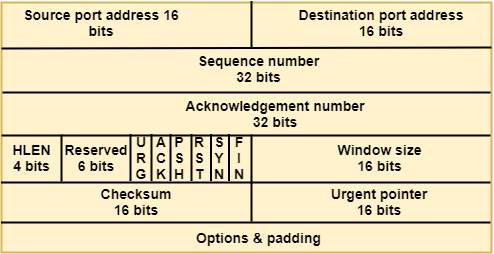
TCP Segment Format

Transport Layer protocols

Where,

  • Source port address: It is used to define the address of the application program in a source computer. It is a 16-bit field.
  • Destination port address: It is used to define the address of the application program in a destination computer. It is a 16-bit field.
  • Sequence number: A stream of data is divided into two or more TCP segments. The 32-bit sequence number field represents the position of the data in an original data stream.
  • Acknowledgement number: A 32-field acknowledgement number acknowledge the data from other communicating devices. If ACK field is set to 1, then it specifies the sequence number that the receiver is expecting to receive.
  • Header Length (HLEN): It specifies the size of the TCP header in 32-bit words. The minimum size of the header is 5 words, and the maximum size of the header is 15 words. Therefore, the maximum size of the TCP header is 60 bytes, and the minimum size of the TCP header is 20 bytes.
  • Reserved: It is a six-bit field which is reserved for future use.
  • Control bits: Each bit of a control field functions individually and independently. A control bit defines the use of a segment or serves as a validity check for other fields.

There are total six types of flags in control field:

  • URG: The URG field indicates that the data in a segment is urgent.
  • ACK: When ACK field is set, then it validates the acknowledgement number.
  • PSH: The PSH field is used to inform the sender that higher throughput is needed so if possible, data must be pushed with higher throughput.
  • RST: The reset bit is used to reset the TCP connection when there is any confusion occurs in the sequence numbers.
  • SYN: The SYN field is used to synchronize the sequence numbers in three types of segments: connection request, connection confirmation ( with the ACK bit set ), and confirmation acknowledgement.
  • FIN: The FIN field is used to inform the receiving TCP module that the sender has finished sending data. It is used in connection termination in three types of segments: termination request, termination confirmation, and acknowledgement of termination confirmation.
    • Window Size: The window is a 16-bit field that defines the size of the window.
    • Checksum: The checksum is a 16-bit field used in error detection.
    • Urgent pointer: If URG flag is set to 1, then this 16-bit field is an offset from the sequence number indicating that it is a last urgent data byte.
    • Options and padding: It defines the optional fields that convey the additional information to the receiver.


User Datagram Protocol (UDP):

User Datagram Protocol (UDP) is a Transport Layer protocol. UDP is a part of Internet Protocol suite, referred as UDP/IP suite. Unlike TCP, it is unreliable and connectionless protocol. So, there is no need to establish connection prior to data transfer. 

  • UDP stands for User Datagram Protocol.
  • UDP is a simple protocol and it provides nonsequenced transport functionality.
  • UDP is a connectionless protocol.
  • This type of protocol is used when reliability and security are less important than speed and size.
  • UDP is an end-to-end transport level protocol that adds transport-level addresses, checksum error control, and length information to the data from the upper layer.
  • The packet produced by the UDP protocol is known as a user datagram.

Though Transmission Control Protocol (TCP) is the dominant transport layer protocol used with most of Internet services; provides assured delivery, reliability and much more but all these services cost us with additional overhead and latency. Here, UDP comes into picture. For the realtime services like computer gaming, voice or video communication, live conferences; we need UDP. Since high performance is needed, UDP permits packets to be dropped instead of processing delayed packets. There is no error checking in UDP, so it also save bandwidth. 
User Datagram Protocol (UDP) is more efficient in terms of both latency and bandwidth.

Features of UDP protocol

The following are the features of the UDP protocol:

  • Transport layer protocol

UDP is the simplest transport layer communication protocol. It contains a minimum amount of communication mechanisms. It is considered an unreliable protocol, and it is based on best-effort delivery services. UDP provides no acknowledgment mechanism, which means that the receiver does not send the acknowledgment for the received packet, and the sender also does not wait for the acknowledgment for the packet that it has sent.

  • Connectionless: The UDP is a connectionless protocol as it does not create a virtual path to transfer the data. It does not use the virtual path, so packets are sent in different paths between the sender and the receiver, which leads to the loss of packets or received out of order.
  • Ordered delivery of data is not guaranteed: In the case of UDP, the datagrams are sent in some order will be received in the same order is not guaranteed as the datagrams are not numbered.
  • Ports: The UDP protocol uses different port numbers so that the data can be sent to the correct destination. The port numbers are defined between 0 and 1023.
  • Faster transmission: UDP enables faster transmission as it is a connectionless protocol, i.e., no virtual path is required to transfer the data. But there is a chance that the individual packet is lost, which affects the transmission quality. On the other hand, if the packet is lost in TCP connection, that packet will be resent, so it guarantees the delivery of the data packets.
  • Acknowledgment mechanism: The UDP does have any acknowledgment mechanism, i.e., there is no handshaking between the UDP sender and UDP receiver. If the message is sent in TCP, then the receiver acknowledges that I am ready, then the sender sends the data. In the case of TCP, the handshaking occurs between the sender and the receiver, whereas in UDP, there is no handshaking between the sender and the receiver.
  • Segments are handled independently: Each UDP segment is handled individually of others as each segment takes different path to reach the destination. The UDP segments can be lost or delivered out of order to reach the destination as there is no connection setup between the sender and the receiver.
  • Stateless: It is a stateless protocol that means that the sender does not get the acknowledgement for the packet which has been sent. 

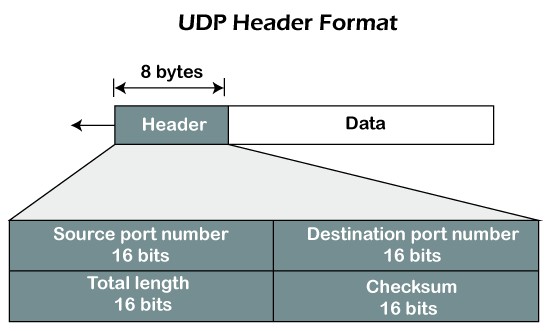
UDP Header Format

UDP Protocol
In UDP, the header size is 8 bytes, and the packet size is upto 65,535 bytes. But this packet size is not possible as the data needs to be encapsulated in the IP datagram, and an IP packet, the header size can be 20 bytes; therefore, the maximum of UDP would be 65,535 minus 20. The size of the data that the UDP packet can carry would be 65,535 minus 28 as 8 bytes for the header of the UDP packet and 20 bytes for IP header.

The UDP header contains four fields:

  • Source port number: It is 16-bit information that identifies which port is going t send the packet.
  • Destination port number: It identifies which port is going to accept the information. It is 16-bit information which is used to identify application-level service on the destination machine.
  • Length: It is 16-bit field that specifies the entire length of the UDP packet that includes the header also. The minimum value would be 8-byte as the size of the header is 8 bytes.
  • Checksum: It is a 16-bits field, and it is an optional field. This checksum field checks whether the information is accurate or not as there is the possibility that the information can be corrupted while transmission. It is an optional field, which means that it depends upon the application, whether it wants to write the checksum or not. If it does not want to write the checksum, then all the 16 bits are zero; otherwise, it writes the checksum. In UDP, the checksum field is applied to the entire packet, i.e., header as well as data part whereas, in IP, the checksum field is applied to only the header field.

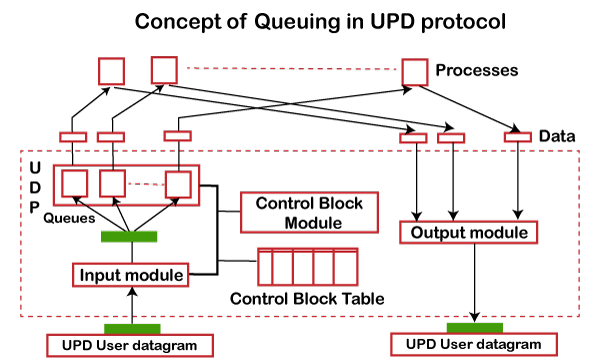
Concept of Queuing in UDP protocol

UDP Protocol

In UDP protocol, numbers are used to distinguish the different processes on a server and client. We know that UDP provides a process to process communication. The client generates the processes that need services while the server generates the processes that provide services. The queues are available for both the processes, i.e., two queues for each process. The first queue is the incoming queue that receives the messages, and the second one is the outgoing queue that sends the messages. The queue functions when the process is running. If the process is terminated then the queue will also get destroyed.

UDP handles the sending and receiving of the UDP packets with the help of the following components:

  • Input queue: The UDP packets uses a set of queues for each process.
  • Input module: This module takes the user datagram from the IP, and then it finds the information from the control block table of the same port. If it finds the entry in the control block table with the same port as the user datagram, it enqueues the data.
  • Control Block Module: It manages the control block table.
  • Control Block Table: The control block table contains the entry of open ports.
  • Output module: The output module creates and sends the user datagram.

Several processes want to use the services of UDP. The UDP multiplexes and demultiplexes the processes so that the multiple processes can run on a single host.

Limitations

  • It provides an unreliable connection delivery service. It does not provide any services of IP except that it provides process-to-process communication.
  • The UDP message can be lost, delayed, duplicated, or can be out of order.
  • It does not provide a reliable transport delivery service. It does not provide any acknowledgment or flow control mechanism. However, it does provide error control to some extent.

Advantages

  • It produces a minimal number of overheads.

Disadvantages of UDP protocol

  • UDP provides basic functions needed for the end-to-end delivery of a transmission.
  • It does not provide any sequencing or reordering functions and does not specify the damaged packet when reporting an error.
  • UDP can discover that an error has occurred, but it does not specify which packet has been lost as it does not contain an ID or sequencing number of a particular data segment.

Transmission Control Protocol (TCP) and User Datagram Protocol (UDP) both are protocols of the Transport Layer. TCP is a connection-oriented protocol where as UDP is a part of the Internet Protocol suite, referred to as the UDP/IP suite. Unlike TCP, it is an unreliable and connectionless protocol.

Transmission Control Protocol (TCP)

TCP (Transmission Control Protocol) is one of the main protocols of the Internet protocol suite. It lies between the Application and Network Layers which are used in providing reliable delivery services. It is a connection-oriented protocol for communications that helps in the exchange of messages between different devices over a network. The Internet Protocol (IP), which establishes the technique for sending data packets between computers, works with TCP. 

Transmission Control Protocol

Transmission Control Protocol

Features of TCP

  • TCP keeps track of the segments being transmitted or received by assigning numbers to every single one of them.
  • Flow control limits the rate at which a sender transfers data. This is done to ensure reliable delivery.
  • TCP implements an error control mechanism for reliable data transfer.
  • TCP takes into account the level of congestion in the network.

Advantages of TCP

  • It is reliable for maintaining a connection between Sender and Receiver.
  • It is responsible for sending data in a particular sequence.
  • Its operations are not dependent on OS.
  • It allows and supports many routing protocols.
  • It can reduce the speed of data based on the speed of the receiver.

Disadvantages of TCP

  • It is slower than UDP and it takes more bandwidth.
  • Slower upon starting of transfer of a file.
  • Not suitable for LAN and PAN Networks.
  • It does not have a multicast or broadcast category.
  • It does not load the whole page if a single data of the page is missing.

User Datagram Protocol (UDP)

User Datagram Protocol (UDP) is a Transport Layer protocol. UDP is a part of the Internet Protocol suite, referred to as the UDP/IP suite. Unlike TCP, it is an unreliable and connectionless protocol. So, there is no need to establish a connection before data transfer. The UDP helps to establish low-latency and loss-tolerating connections establish over the network. The UDP enables process-to-process communication.

User Datagram Protocol

User Datagram Protocol

Features of UDP

  • Used for simple request-response communication when the size of data is less and hence there is lesser concern about flow and error control.
  • It is a suitable protocol for multicasting as UDP supports packet switching.
  • UDP is used for some routing update protocols like RIP(Routing Information Protocol).
  • Normally used for real-time applications which can not tolerate uneven delays between sections of a received message.

Advantages of UDP

  • It does not require any connection for sending or receiving data.
  • Broadcast and Multicast are available in UDP.
  • UDP can operate on a large range of networks.
  • UDP has live and real-time data.
  • UDP can deliver data if all the components of the data are not complete.

Disadvantages of UDP

  • We can not have any way to acknowledge the successful transfer of data.
  • UDP cannot have the mechanism to track the sequence of data.
  • UDP is connectionless, and due to this, it is unreliable to transfer data.
  • In case of a Collision, UDP packets are dropped by Routers in comparison to TCP.
  • UDP can drop packets in case of detection of errors.

Which Protocol is Better: TCP or UDP?

The answer to this question is difficult because it totally depends on what work we are doing and what type of data is being delivered. UDP is better in the case of online gaming as it allows us to work lag-free. TCP is better if we are transferring data like photos, videos, etc. because it ensures that data must be correct has to be sent.

In general, both TCP and UDP are useful in the context of the work assigned by us. Both have advantages upon the works we are performing, that’s why it is difficult to say, which one is better.

Difference Between TCP and UDP

Difference Between TCP and UDP

Where TCP is Used?

  • Sending Emails
  • Transferring Files
  • Web Browsing

Where UDP is Used?

  • Gaming
  • Video Streaming
  • Online Video Chats

Differences between TCP and UDP

The main differences between TCP (Transmission Control Protocol) and UDP (User Datagram Protocol) are:

Basis        Transmission Control Protocol (TCP)       User Datagram Protocol (UDP)
Type of Service

TCP is a connection-oriented protocol. Connection 

orientation means that the communicating devices should establish a connection before transmitting data and should close the connection after transmitting the data.

UDP is the Datagram-oriented protocol. This is because 

there is no overhead for opening a connection, maintaining a connection, or terminating a connection. UDP is efficient for broadcast and multicast types of network transmission.

ReliabilityTCP is reliable as it guarantees the delivery of data to the destination router.The delivery of data to the destination cannot be guaranteed in UDP.
Error checking mechanism                                 

TCP provides extensive error-checking mechanisms. 

It is because it provides flow control and acknowledgment of data.

UDP has only the basic error-checking mechanism using checksums.
AcknowledgmentAn acknowledgment segment is present.No acknowledgment segment.
Sequence

Sequencing of data is a feature of Transmission Control 

Protocol (TCP). this means that packets arrive in order at the receiver.

There is no sequencing of data in UDP. If the order is required, it has to be managed by the application layer.
SpeedTCP is comparatively slower than UDP.UDP is faster, simpler, and more efficient than TCP.
RetransmissionRetransmission of lost packets is possible in TCP, but not in UDP.There is no retransmission of lost packets in the User Datagram Protocol (UDP).
Header LengthTCP has a (20-60) bytes variable length header.UDP has an 8 bytes fixed-length header.
WeightTCP is heavy-weight.UDP is lightweight.
Handshaking TechniquesUses handshakes such as SYN, ACK, SYN-ACKIt’s a connectionless protocol i.e. No handshake
BroadcastingTCP doesn’t support Broadcasting.UDP supports Broadcasting.
ProtocolsTCP is used by HTTP, HTTPs, FTP, SMTP and Telnet.UDP is used by DNS, DHCP, TFTP, SNMP, RIP, and VoIP.
Stream TypeThe TCP connection is a byte stream.UDP connection is a message stream.
OverheadLow but higher than UDP.Very low.
ApplicationsThis protocol is primarily utilized in situations when a safe and trustworthy communication procedure is necessary, such as in email, on the web surfing, and in military services.This protocol is used in situations where quick communication is necessary but where dependability is not a concern, such as VoIP, game streaming, video, and music streaming, etc.

Example: Suppose there are two houses, H1 and H2, and a letter has to be sent from H1 to H2. But there is a river in between those two houses. Now how can we send the letter? 
Solution 1: Make a bridge over the river and then it can be delivered. 
Solution 2: Get it delivered by a pigeon. 

  • Consider the first solution as TCP. A connection has to be made (bridge) to get the data (letter) delivered. The data is reliable because it will directly reach another end without loss of data or error.
  • The second solution is UDP. No connection is required for sending the data. The process is fast as compared to TCP, where we need to set up a connection(bridge). But the data is not reliable: we don’t know whether the pigeon will go in the right direction, will drop the letter on the way, or some issue is encountered mid-travel.


Labels: ,